TL;DR — Gateway 出問題?先跑呢 3 個指令
# 1. 睇 Gateway 狀態(有冇跑、有冇警告)
openclaw gateway status

# 2. 自動診斷 + 修復最常見問題
openclaw doctor

# 3. 睇最近 50 行 log
cat /tmp/openclaw/openclaw-$(date +%Y-%m-%d).log | tail -50
跑完呢三個之後,90% 嘅問題都會有線索。唔知點繼續?睇下面逐個問題嘅分析。
Gateway 排錯 Flowchart
Gateway 唔 work?
     │
     ▼
openclaw gateway status 有冇輸出?
     │
  ┌──┴──┐
 冇     有
  │     │
  ▼     ▼
Gateway  有冇黃色 warning?
未跑     │
  │   ┌──┴──┐
  │  冇     有
  │   │     │
  ▼   │     ▼
openclaw  openclaw doctor
gateway    --repair
 start     │
  │        ▼
  └──► 重試 gateway status
         │
         ▼
     Port 18789 通唔通?
         │
      ┌──┴──┐
     通    唔通
      │     │
      ▼     ▼
  Auth 設   lsof -i :18789
  咗未?    睇邊個佔用
      │
   ┌──┴──┐
  設咗  未設
   │     │
   ▼     ▼
 ✅   openclaw config set
  OK  gateway.auth.mode token
問題一:Gateway Service Config 過時(黃色警告)
症狀:
openclaw gateway status
⚠ Service config looks out of date or non-standard
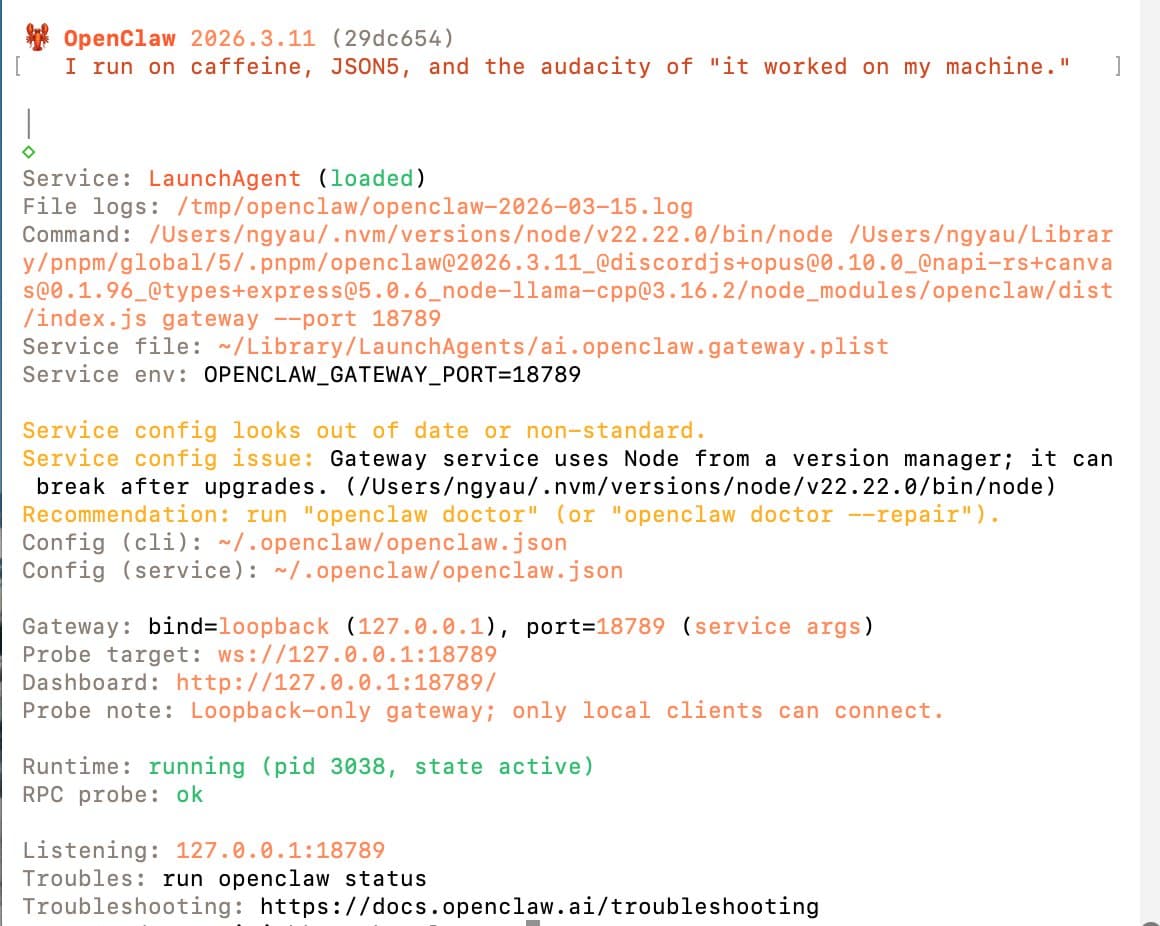
原因:
Gateway service 係用 nvm 管理嘅 Node.js 路徑來記錄 entrypoint。一旦你升級咗 Node.js 版本,舊路徑就會失效,service config 就會過時。
呢個係用 nvm + pnpm 組合安裝 OpenClaw 最常見嘅坑之一。
修復方法:
# 自動診斷
openclaw doctor

# 如果 doctor 發現問題,加 --repair 自動修復
openclaw doctor --repair
修復之後重跑 openclaw gateway status 確認警告消失。
問題二:Gateway Service 內嵌 Token(安全警告)
症狀:
openclaw doctor
⚠ OPENCLAW_GATEWAY_TOKEN embedded in service
  Recommendation: use environment variable instead
原因:
Gateway token 被直接寫死喺 service file 入面,而唔係用環境變數。呢個係安全問題——如果有人讀到你嘅 service file,就可以拿到你嘅 token。
Token 外洩風險: 寫死嘅 token 會出現喺 systemctl cat openclaw-gateway 輸出、backup files、甚至 CI logs 入面。用環境變數係正確做法。
修復方法:
# 重新安裝 gateway service,會正確設定環境變數
openclaw gateway install --force

# 確認修復
openclaw doctor
修復後,token 喺 openclaw gateway config 輸出入面應該顯示 REDACTED,唔係明文。
問題三:Entrypoint Mismatch(路徑錯誤)
症狀:
Gateway 啟動失敗,或者 openclaw gateway status 顯示 service inactive,但你確定已經安裝咗。
原因:
用 pnpm 安裝咗新版 OpenClaw,但 service file 仍然指向舊嘅 nvm Node.js 路徑。例如:
- Service 指向:
/Users/ngyau/.nvm/versions/node/v20.10.0/bin/node - 實際路徑:
/Users/ngyau/.nvm/versions/node/v22.12.0/bin/node
修復方法:
# doctor --fix 會自動更新 entrypoint 到正確路徑
openclaw doctor --fix

# 重啟 gateway
openclaw gateway restart

# 確認狀態
openclaw gateway status
問題四:Log 查看方法(常見誤區)
症狀:
openclaw logs gateway --lines 50
# error: unknown option '--lines'

openclaw logs gateway -n 50
# error: unknown option '-n'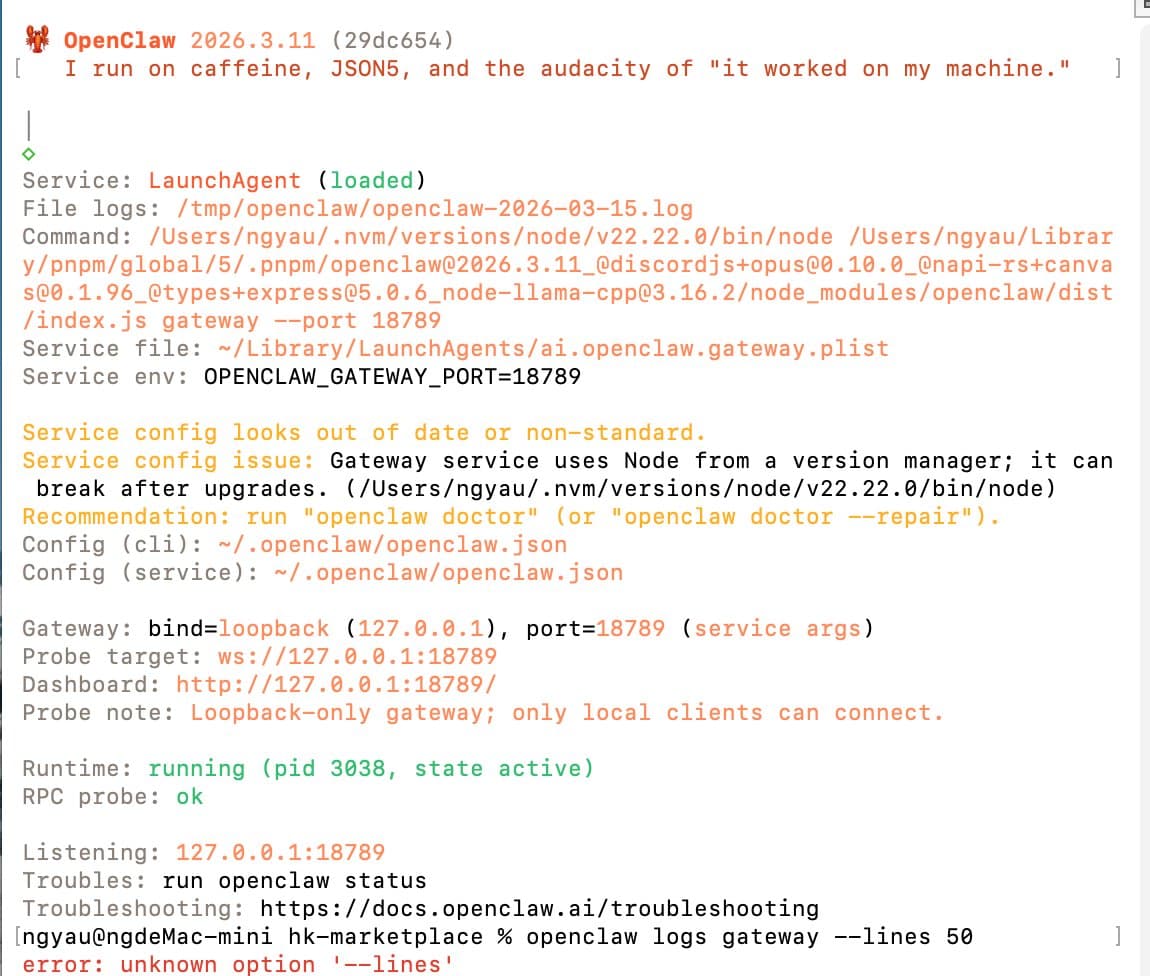
原因:
openclaw logs 指令唔支持 --lines 或 -n 參數(至少喺 v2026.3.11 係咁)。
正確方法:直接讀 log file
# 睇今日 log,最後 50 行
cat /tmp/openclaw/openclaw-$(date +%Y-%m-%d).log | tail -50

# 睇最後 100 行
cat /tmp/openclaw/openclaw-$(date +%Y-%m-%d).log | tail -100

# 即時跟蹤 log(live)
tail -f /tmp/openclaw/openclaw-$(date +%Y-%m-%d).log

# 搵特定關鍵字
grep "ERROR" /tmp/openclaw/openclaw-$(date +%Y-%m-%d).log
Log 係 JSON 格式,用 jq 更易睇:
# 格式化輸出
cat /tmp/openclaw/openclaw-$(date +%Y-%m-%d).log | tail -20 | jq '.'

# 只睇錯誤
cat /tmp/openclaw/openclaw-$(date +%Y-%m-%d).log | jq 'select(.level == "error")'

# 只睇 gateway 相關
cat /tmp/openclaw/openclaw-$(date +%Y-%m-%d).log | jq 'select(.component == "gateway")'
唔確定 log 喺邊? 跑 openclaw config get paths 睇 log directory 設定。
問題五:Deprecated Auth Profiles(舊版認證)
症狀:
openclaw doctor
⚠ Deprecated external CLI auth profiles found:
  - anthropic:claude-cli
  - openai-codex:codex-cli
  Recommend removing and migrating to current auth methods
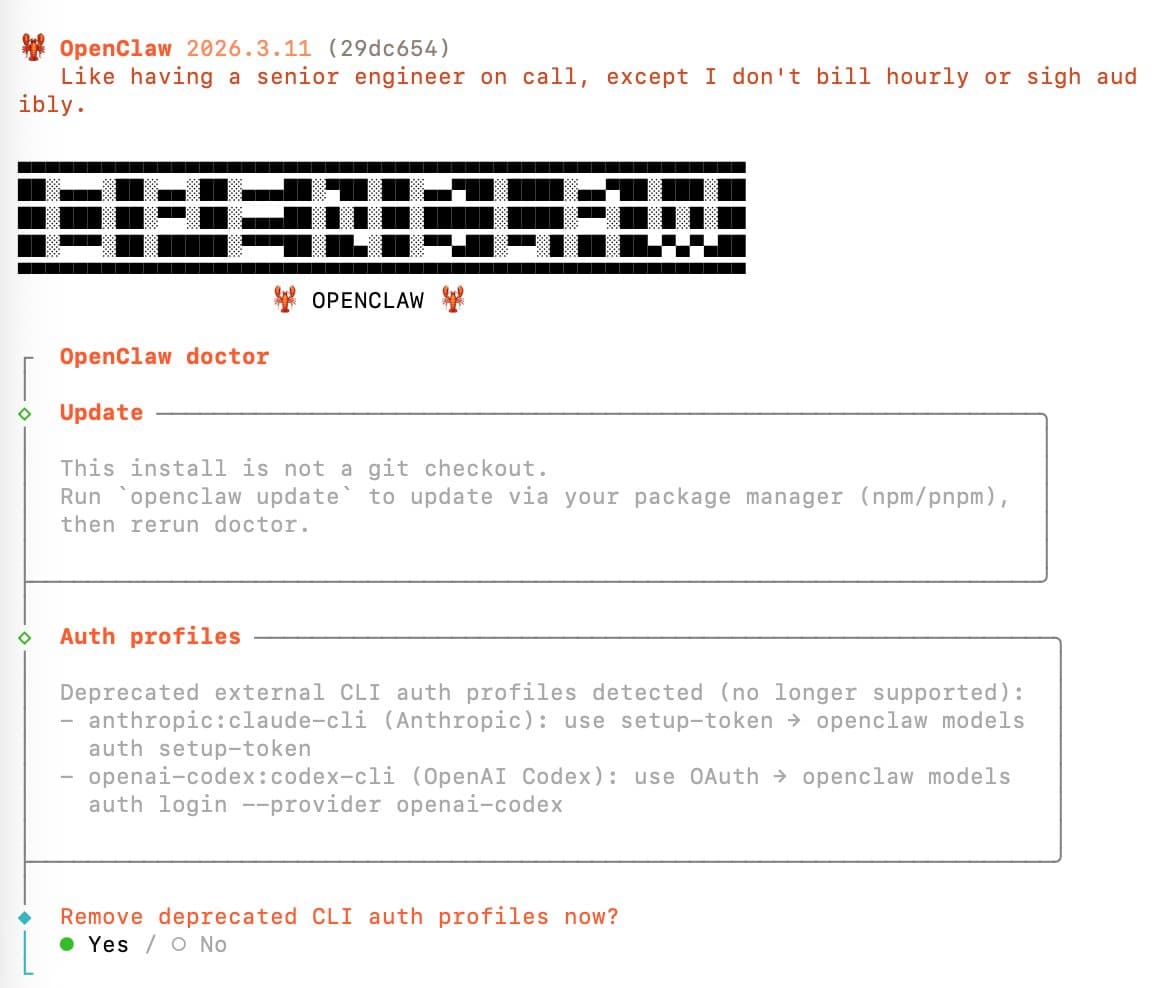
原因:
早期版本嘅 OpenClaw 用外部 CLI auth profiles 管理 API 認證,新版已有內建嘅認證方式取代。
修復方法:
# 跑 doctor,會問你要唔要 remove
openclaw doctor

# 如果係 Anthropic / Claude CLI profile
openclaw models auth setup-token

# 如果係 OpenAI Codex profile
openclaw models auth login --provider openai-codex

# 確認舊 profiles 已移除
openclaw doctor
Doctor 會逐個 profile 問你確認,可以放心按 y remove。
問題六:Gateway Connection Refused
症狀:
curl http://localhost:18789/health
# curl: (7) Failed to connect to localhost port 18789: Connection refused
或者 Telegram 收唔到 Agent 回覆,睇 log 見到 connection refused。
原因 A:Gateway 未啟動
# 啟動 Gateway
openclaw gateway start

# 確認
openclaw gateway status
原因 B:Port 18789 被其他程式佔用
# 睇係咩程式佔用
lsof -i :18789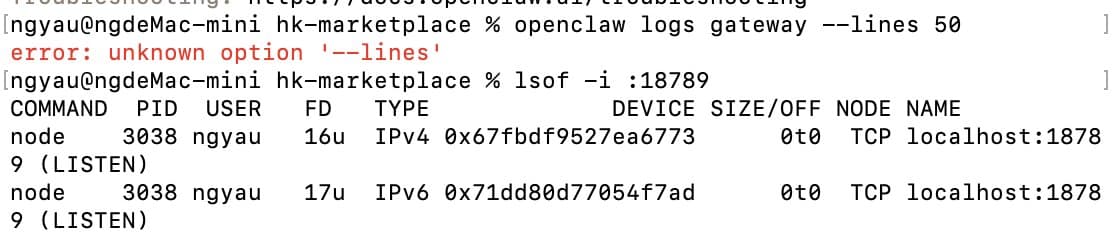
如果見到係另一個 openclaw process,可能係殭屍 process:
# Kill 佢再重啟
pkill -f "openclaw-gateway"
openclaw gateway start
原因 C:Bind 設定錯誤
# 睇現時 gateway config
openclaw config get gateway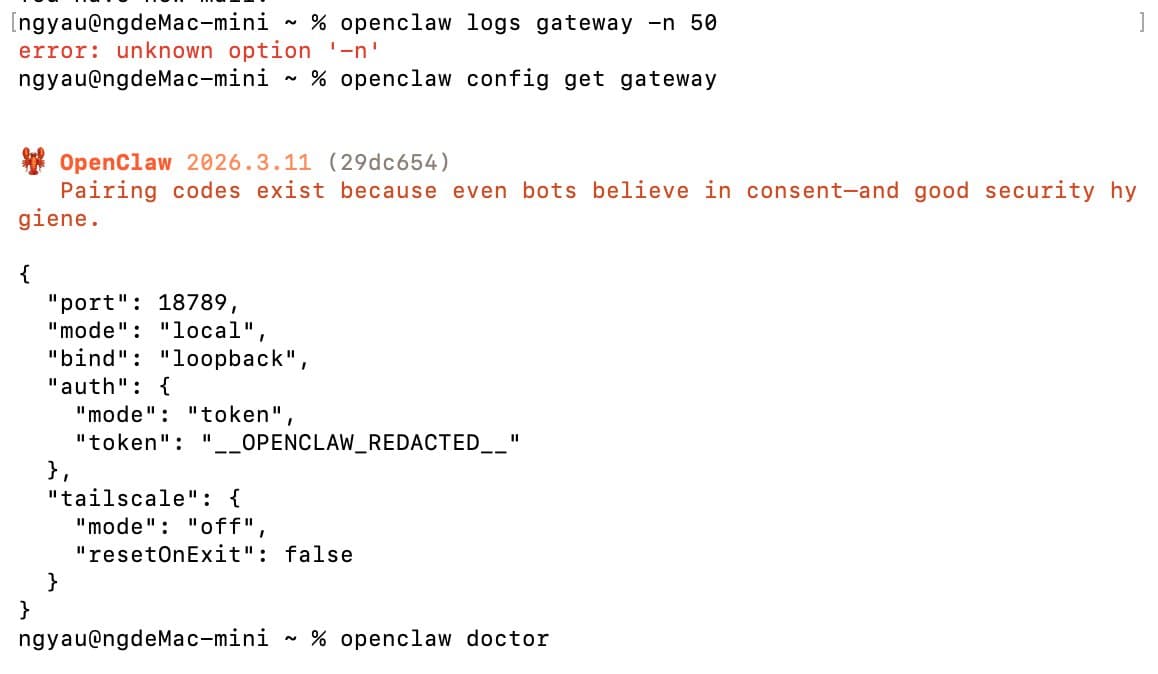
確認 bind 設定係 loopback 或 127.0.0.1:18789,唔係 disabled:
# 修復 bind 設定
openclaw config set gateway.bind loopback
openclaw gateway restart
原因 D:macOS 防火牆封鎖
去 系統設定 → 網絡 → 防火牆,確認 OpenClaw 有被允許接受連線。
問題七:Gateway Auth Mode 未設定(v2026.3.7+ Breaking Change)
症狀:
openclaw gateway start
✗ Gateway startup failed: auth.mode is required (v2026.3.7+)
  Run: openclaw config set gateway.auth.mode token
原因:
v2026.3.7 引入咗 breaking change:Gateway 要求明確設定 auth.mode。舊版本升級上來嘅用戶,config 裡面可能冇呢個設定,Gateway 就會拒絕啟動。
升級注意: 從 v2026.3.6 或以下升級,必須手動設定 gateway.auth.mode,否則 Gateway 唔會自動跟舊行為。
修復方法:
# 設定 auth mode 為 token(推薦)
openclaw config set gateway.auth.mode token

# 確認設定
openclaw config get gateway

# 重啟
openclaw gateway restart
安全的 Gateway Config 應該係咁:
{
  "bind": "loopback",
  "auth": {
    "mode": "token",
    "token": "REDACTED"
  },
  "tailscale": {
    "mode": "off"
  }
}
呢個 config 代表:只接受本機連線(loopback)、用 token 認證、唔用 Tailscale。係安全嘅設定。參考完整安全設定指南了解更多。
問題八:Gateway 正常但 Telegram 收唔到訊息
症狀:
openclaw gateway status 顯示正常,但 Telegram Bot 唔回覆。
排查步驟:
第一步:確認 RPC Probe 正常
openclaw gateway status
# 睇 "RPC probe" 一行,應該係 ok
如果 RPC probe failed:
openclaw gateway restart第二步:確認 Pairing 已 approve
openclaw channels list
# 睇 Telegram channel 係咪 status: active
如果係 pending:
openclaw channels approve <channel-id>第三步:確認 Agent 有 assign 到 Telegram channel
openclaw agents list
# 確認 agent 有 channels 列表,包含你嘅 Telegram channel
第四步:睇 log 有冇錯誤
cat /tmp/openclaw/openclaw-$(date +%Y-%m-%d).log | grep -i telegram | tail -20FAQ
Q:openclaw doctor 同 openclaw doctor --repair 有咩分別?
openclaw doctor 只係診斷,話你知有咩問題,但唔會改。openclaw doctor --repair 同 --fix 會自動嘗試修復識得處理嘅問題,例如更新 entrypoint、移除內嵌 token 等。建議先跑 doctor 睇下診斷,確認問題後再加 --repair。
Q:每次升級 Node.js 都要重新設定 Gateway service 咩?
係嘅,如果用 nvm 管理 Node.js,升級版本後 service 嘅 entrypoint 會指向舊路徑。跑 openclaw doctor --fix 可以自動更新,建議每次升完 Node.js 都跑一次。
Q:Gateway log 在哪裏?可以改 log 路徑嗎?
預設係 /tmp/openclaw/openclaw-YYYY-MM-DD.log。跑 openclaw config get paths 可以睇 log directory 設定。如果想改路徑,跑 openclaw config set paths.logs /你嘅路徑。
Q:gateway.auth.mode 應該設為 token 定 password?
推薦用 token,因為 token 係隨機生成、難以暴力破解。password 模式用你自己設嘅密碼,安全性取決於密碼強度。詳細比較請睇安全設定指南。
相關文章
- OpenClaw macOS 安裝完整教學 — 由零開始安裝,包括正確設定 Gateway
- OpenClaw 安全避坑指南 — CVE-2026-25253 同 5 大安全風險
- OpenClaw Services 安全設定 — Agent services 最佳設定